

I didn’t open a budget calculator for the first time because I was “good with money.” I opened one because my checking account hit zero three days before payday, and I had no idea how it happened. That was a few years ago, and looking back, it’s the single habit that changed how I handle money more than any investing book or side hustle ever did.
If you’ve ever stared at your bank app wondering where your paycheck disappeared to, this one’s for you. I’m going to walk you through why a monthly budget calculator habit works, how I use mine, the mistakes I made along the way, and exactly how you can set this up in the next twenty minutes.
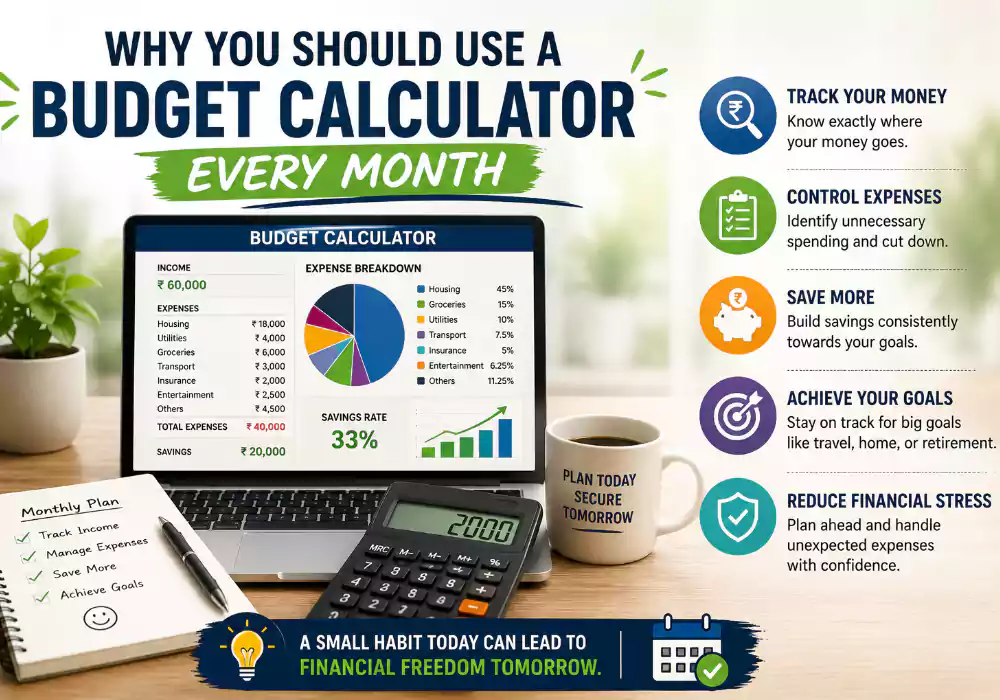
What a Budget Calculator Actually Does (No Jargon, Promise)
A budget calculator is just a tool — an app, a spreadsheet, or a simple online form — that takes your income and expenses and shows you the math. You plug in what comes in, what goes out, and it tells you what’s left over, what’s overspent, and where your money is actually going.
That’s it. No magic formulas, no finance degree required.
The reason it feels powerful isn’t the tool itself. It’s that most of us carry a vague guess about our finances in our head, and a calculator replaces that guess with numbers we can see. Once you see it, you can fix it.
My First Wake-Up Call
When I sat down with a basic budget calculator for the first time, I expected it to confirm what I already believed — that rent and groceries were eating most of my income. They were a big chunk, sure. But the calculator flagged something I hadn’t accounted for: I was spending close to $310 a month on small subscriptions, delivery fees, and “just this once” takeout orders.
None of those individual charges felt big. A coffee app subscription here, a streaming service there, a delivery fee tacked onto an order I barely noticed. Stacked together, they were quietly costing me almost as much as my electricity and water bills combined.
That moment taught me something important: it’s rarely one big purchase that wrecks a budget. It’s the small, repeated stuff hiding in plain sight. A calculator is what makes that visible, because your brain is terrible at adding up dozens of small numbers over thirty days.
Why a One-Time Budget Doesn’t Cut It
Here’s where a lot of people, including past me, get it wrong. They build a budget once, feel proud of themselves, and never look at it again. Then three months later they’re confused about why nothing changed.
A budget isn’t a one-and-done project. Your income shifts, bills change, prices creep up, and life throws in surprise expenses like a car repair or a vet visit. A budget calculator only stays useful if you keep feeding it current numbers.
Think of it less like a diet plan you set once and more like checking your weight on a scale. One reading doesn’t tell you much. A monthly pattern tells you everything.
This is also why so many people quit budgeting and assume it “doesn’t work for them.” It’s not that budgeting failed. It’s that they treated it as a single event instead of a monthly habit.
The Monthly Habit That Actually Sticks
I now run a budget calculator on roughly the same day every month — usually right after my paycheck lands and before any major bills go out. This timing matters more than people expect.
Doing it right after payday means I’m working with current numbers, not guesses from three weeks ago. Doing it before bills hit means I can still adjust spending if something looks off, instead of finding out after the damage is done.
It takes me about fifteen minutes now. The first few months took closer to forty-five, mostly because I was hunting down receipts and trying to remember what that random $22 charge was for.
Step-by-Step: How to Use a Budget Calculator Every Month
If you’re starting from scratch, here’s the exact process I follow. You can do this with a free app, a spreadsheet, or even pen and paper if that’s more your style.
Step 1: Gather your income first. List every dollar coming in for the month — your paycheck, freelance income, side gigs, refunds you’re expecting. Use the actual amount that hits your account, not your salary before taxes.
Step 2: List your fixed expenses. These are the bills that stay roughly the same every month: rent or mortgage, insurance, loan payments, internet, phone. Pull these from last month’s bank statement so you’re working with current numbers, not estimates.
Step 3: Add your variable expenses. Groceries, gas, eating out, entertainment, shopping. These change month to month, so look at your average from the past two or three months rather than guessing.
Step 4: Plug everything into the calculator. Enter income on one side, expenses on the other. Most tools will automatically show your surplus or shortfall once you’re done.
Step 5: Look at the gap, not just the total. If you’ve got money left over, decide where it goes before it disappears into random spending — savings, debt payoff, or a planned treat. If you’re short, this is where you trim variable expenses first, since those are easiest to adjust.
Step 6: Set one or two specific limits for the month. Don’t try to fix everything at once. I usually pick one category that got out of hand, like dining out, and set a firm cap for the next thirty days.
Step 7: Check back mid-month. A quick five-minute glance around day fifteen lets you catch overspending before it snowballs. This single step has saved me from overdraft fees more than once.
Step 8: Repeat next month with updated numbers. This is the part people skip. The calculator only stays accurate if you keep updating it as your situation changes.
Tools That Make This Easier
You don’t need anything fancy to start. Here’s what I’ve personally tried, along with honest thoughts on each.
Spreadsheets (Google Sheets or Excel): This is where I started, and it’s genuinely still a solid option if you like full control. You can build your own categories and formulas, and it’s completely free. The downside is you have to manually update everything, which means it only works if you’re disciplined about sitting down each month.
EveryDollar: Built around the zero-based budgeting method, where every dollar gets assigned a job before the month starts. I liked how clean and simple the layout was when I tried it, especially for beginners who get overwhelmed by too many categories.
PocketGuard: This one’s good if you tend to overspend, since it shows you a simple “money left to spend” figure after bills and goals are accounted for, instead of just raw totals.
Goodbudget: A solid pick if you like the envelope budgeting style, where you mentally (or digitally) divide cash into spending “envelopes” for groceries, fun money, and so on.
Quicken Simplifi or Monarch: These lean more toward a full financial dashboard, syncing bank and investment accounts so you see budgeting and net worth in one place. Worth it if you want a more complete money picture, though they usually come with a monthly fee.
Bank app calculators: A lot of banking apps now include a built-in spending breakdown or simple budget calculator. It’s not as detailed as a dedicated app, but it’s a decent free starting point if you just want a quick snapshot.
There’s no single “best” option here. The right tool is whichever one you’ll actually open every month. I’ve seen people buy the most advanced app available and abandon it within two weeks because it felt like homework.
A Quick Example to Make This Concrete
Let’s say your monthly take-home pay is $3,400. Your fixed bills — rent, insurance, phone, internet — add up to $1,750. Your average variable spending over the past few months is $1,200 between groceries, gas, and going out.
That leaves $450. Without a calculator, that $450 tends to vanish into small purchases over the month. With a calculator, you actually decide what it does — maybe $250 toward an emergency fund, $100 toward a credit card balance, and $100 left as guilt-free spending money.
The math itself isn’t complicated. What changes is that you’re choosing where the money goes instead of finding out after the fact where it went.
Mistakes I See People Make (Because I Made Them Too)
1: Estimating instead of checking actual numbers. I used to guess my grocery spending was around $300. It was closer to $480. Guessing feels easier in the moment, but it quietly wrecks the accuracy of your whole budget.
2: Making the budget too strict. My first attempt cut entertainment and dining out to almost nothing. I lasted about ten days before frustration led to a spending splurge that undid weeks of progress. Leave a little breathing room, or you’ll burn out fast.
3: Forgetting irregular expenses. Car registration, annual subscriptions, holiday gifts, birthday spending — these don’t happen every month, so they get forgotten until they show up and blow a hole in your budget. Now I keep a small running list of these and divide them across twelve months in advance.
4: Only tracking spending, never reviewing it. Logging expenses is only half the job. If you never sit down and compare your plan against what actually happened, the calculator becomes a diary instead of a decision-making tool.
5: Quitting after one bad month. There will be months where you go over budget. That doesn’t mean budgeting failed — it means you have data to adjust next month. I overspent on travel last summer and instead of giving up, I just trimmed the following two months to balance it out.
What Changed for Me After Doing This Consistently
After about six months of monthly check-ins, a few things shifted that surprised me.
First, I stopped feeling anxious every time I checked my bank balance. Knowing the numbers, even when they weren’t great, felt better than not knowing at all.
Second, I built an emergency fund without it feeling painful, simply because I was directing leftover money on purpose instead of letting it disappear.
Third, and this one caught me off guard, I started making better decisions about big purchases too. When you know your monthly numbers cold, it becomes obvious whether something fits your situation or not, without needing to do mental math under pressure in a store.
None of this happened from one good month. It happened from showing up with the calculator every single month, even the boring ones where nothing exciting was going on financially.
How This Connects to Bigger Financial Goals
If you’re trying to pay off debt, save for a house, or build retirement savings, a monthly budget calculator isn’t optional homework — it’s the foundation everything else sits on.
Debt payoff calculators, retirement calculators, and savings goal trackers all work off the same core input: how much money you actually have left after expenses. If that number is fuzzy, every other plan built on top of it is fuzzy too.
I think of the monthly budget check as the home base. Everything else — investing, saving for a trip, paying off a credit card — branches off from knowing that one number clearly.
Budgeting When Your Paycheck Isn’t the Same Every Month
A good chunk of my readers are freelancers, gig workers, or people on commission, and they always ask the same question: how do you run a monthly budget calculator when income bounces around?
Here’s what worked for me during a stretch of freelance work with unpredictable invoices. Instead of budgeting off your best month, budget off your lowest realistic month from the past six to twelve months. That number becomes your baseline for fixed bills and essentials.
Anything you earn above that baseline in a stronger month gets split between savings, debt payoff, and a buffer account that covers the leaner months. This way, a slow month doesn’t wreck your plan, because you already built the calculator around the worst-case scenario, not the best one.
It takes discipline not to spend a big invoice the moment it lands. But once you’ve got two or three months of buffer built up, the whole process gets noticeably less stressful, and the calculator stops feeling like a guessing game.
A Health and Fitness Comparison That Made It Click for Me
I spend a lot of time around fitness tracking too, and the parallel between a food log and a budget calculator is almost identical. Nobody loses weight by stepping on a scale once and calling it done. Progress comes from consistent check-ins that show patterns over time.
Money works the same way. One budget session tells you almost nothing useful. Twelve months of check-ins tell you exactly where your habits are working and where they’re quietly working against you.
I treat my monthly budget review the same way I treat a weekly fitness check-in: not as a test to pass or fail, but as a data point that helps me adjust course before small problems turn into bigger ones.
Quick Answers to Common Questions
How long does a monthly budget check actually take? After the first couple of months, fifteen to twenty minutes is typical, assuming your accounts are linked to an app or your spreadsheet is already set up.
What if my numbers come out negative? That’s actually useful information, not a failure. It tells you exactly which categories need trimming this month, instead of finding out when your card gets declined.
Should couples budget together or separately? Either can work, but if you share expenses, at minimum run the calculator together once a month so you’re both working off the same numbers. A lot of money arguments come from two people operating on two different mental versions of the budget.
Do I need a paid app to get started? No. A free spreadsheet template or a free tier of an app like Goodbudget or PocketGuard is plenty to start building the habit. You can always upgrade later if you outgrow the free features.
Looking Back Over a Full Year
Something I didn’t expect when I started this habit was how useful it becomes once you have twelve months of data sitting in one place. Around the one-year mark, I scrolled back through every month side by side, and patterns showed up that a single month never would have revealed.
Grocery spending crept up nearly twenty percent over the year without me noticing month to month. Gas costs spiked predictably every winter because of a longer commute during bad weather. Subscription costs quietly grew every time I signed up for a free trial and forgot to cancel before it converted to a paid plan.
None of that would have been obvious from one budget check. It only became visible because the calculator gave me a consistent, repeated snapshot to compare against itself. That’s the part people miss when they think of budgeting as a single task to finish rather than an ongoing record worth revisiting.
If you stick with the monthly habit for even six months, take time to look back at the full stretch, not just the most recent entry. That’s usually where the most useful insights are hiding.
Getting Started This Week
If you’ve never done this before, don’t overthink it. Pick one tool from the list above, pull up your last bank statement, and block out twenty minutes this weekend.
Your first month won’t be perfect. Mine certainly wasn’t. You’ll probably forget a few expenses, underestimate a category, or discover a bill you thought was $40 is actually $65. That’s normal, and it’s exactly why month two and month three matter so much.
The goal isn’t a flawless budget. It’s a clearer picture of your money than you had last month, building one check-in at a time.
1. Why is a monthly budget calculator important?
A monthly budget calculator helps track income, expenses, savings, and debt in one place. It improves financial awareness and prevents overspending.
2. Can budgeting really reduce financial stress?
Yes. Budgeting reduces uncertainty by giving you a clear financial plan. Knowing where your money goes creates confidence and peace of mind.
3. What is the best budgeting method for beginners?
The 50/30/20 rule is often best for beginners because it is simple and easy to follow while balancing needs, wants, and savings.
4. How often should I update my budget calculator?
You should review and update your budget at least once every month. Weekly check-ins can also help maintain accuracy.
5. Are budget calculators better than spreadsheets?
Budget calculators are usually faster and more automated than spreadsheets. They simplify tracking, generate reports, and reduce manual calculation errors.